| |
|
|
|
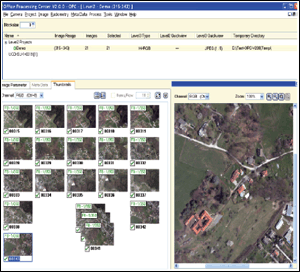
OPC
user support in the setup of the color image
creation to Level-3. By presenting all images
of a block, sub-assembly or strip, the user
can set the color and ensure that a ground
point has the same color, irrespective of
the image and the location in it.
|
|
The large format digital aerial images are collected
in the air by the UltraCam system so that each triggered
image is presented in 13 separate files (Level-0). The
panchromatic image is in 9 separate “tiles”
that need to get stitched, color is in an additional
4 separate files that need to be registered and added
to the panchromatic data. The transition from the raw
Level-0 data to the final Level-3 color images is by
postprocessing using Microsoft Office Processing Center
software (OPC). Since the initial UltraCam deliveries
at the beginning of 2004, we have listened to our customers
and have addressed many of their suggestions. The updates
to the OPC software, as a result, are now greatly improved.

F E A T U R E S
- Fully-automatic and unattended processing from Level-0
to Level-2
- Extensive management and quality control of the
raw image data
- Intuitive WYSIWYG for image previews and histograms
with statistics of all processing levels, radiometric
analysis and optimization
- Rich interactive options to adjust the color radiometry
for Level-3 output Integrated dodging functionality
- Flexible handling of meta data with GPS and system
flight management
- Processing pipeline entirely 16-bit
- Flexibility and versatility in Level-3 output with
all TIFF options, JPEG, 8 and 16 bit, single channel,
RGB, CIR, or multi-channel (R-G-B-I) at high or low
resolutions
- Customizable naming of Level-3 output files by using
meta data information
- Separate licensing for Level-2 to Level-3 conversion,
for endusers of digital images who do not operate
|
|